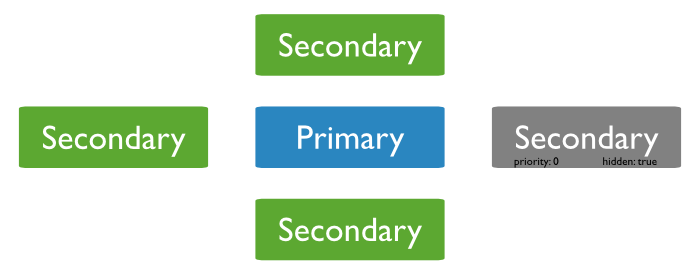
Primary and secondary members
Primary acceptes all writes + reads + records them in oplog
Secondary replicates primary oplogs (also accept reads)
MongoDB durability
Replication principles
Replica set Read and Write Semantics
Sharding
Replica&sharding practice
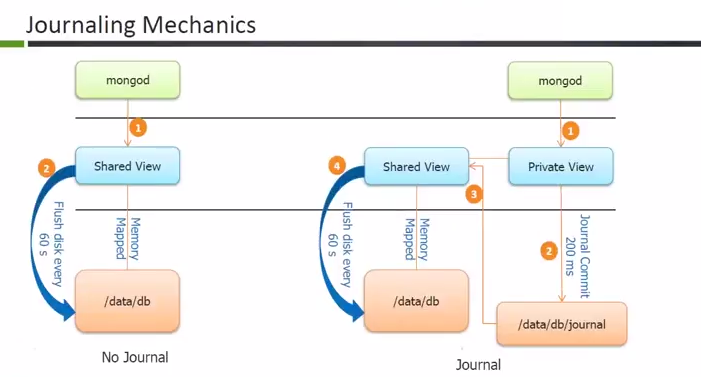
journal
low level log of an operation for crash recovery (can be turned off)
oplog
similar to RDBMS binlog
stores (idempotent) high-level transactions that modify the database
kept on the master and used for replication
MongoDB write path
Replication principles
Replica set Read and Write Semantics
Sharding
Replica&sharding practice
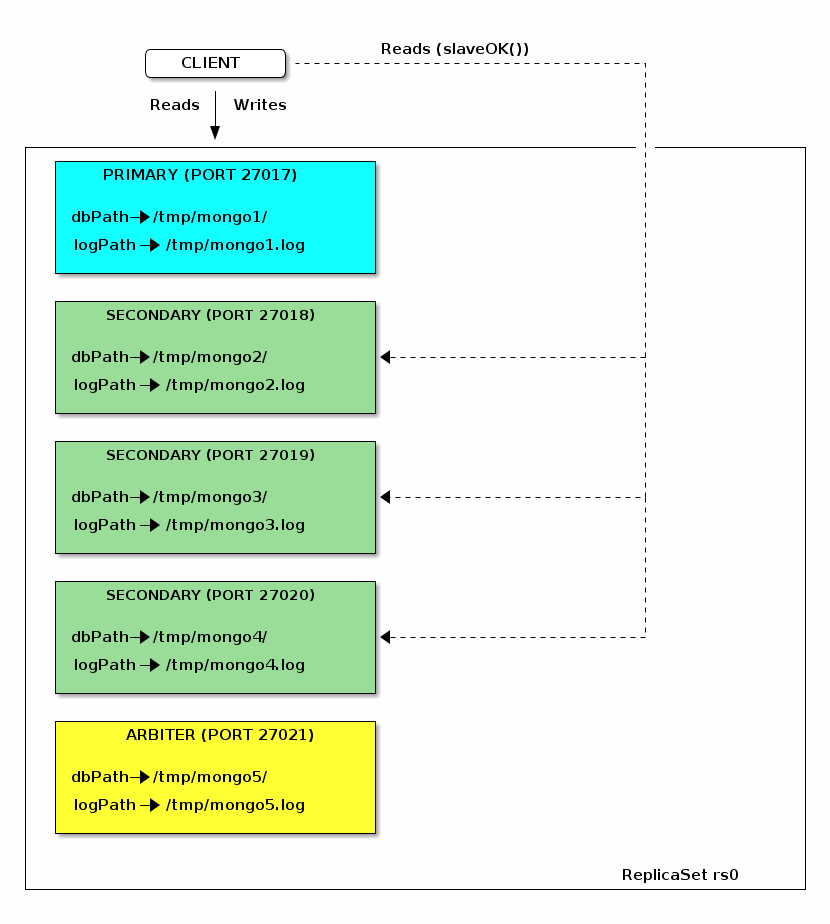
Replica set = a group of mongod processes that provide redundancy and high availability
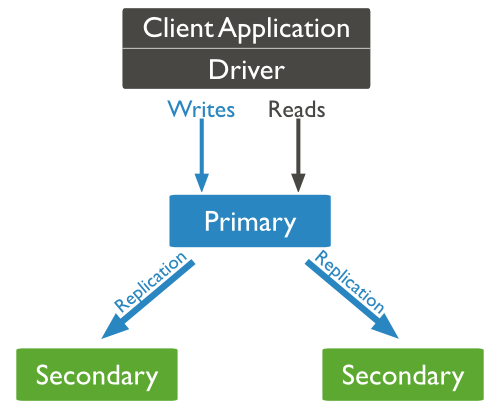
Writes: write to single node replicated to the others members of the replica set
Read: read from a single member of the replica set
Primary
acceptes all writes and reads
1 primary per replica set
Secondaries replicates data (and can serve reads ⇒ reads preferences)
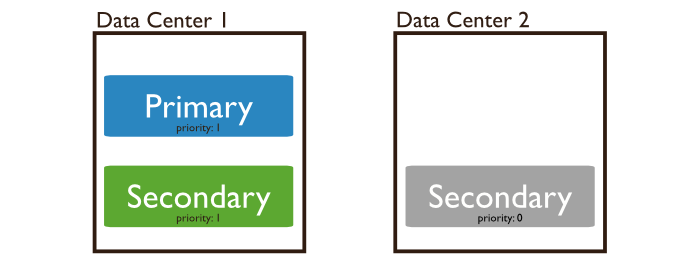
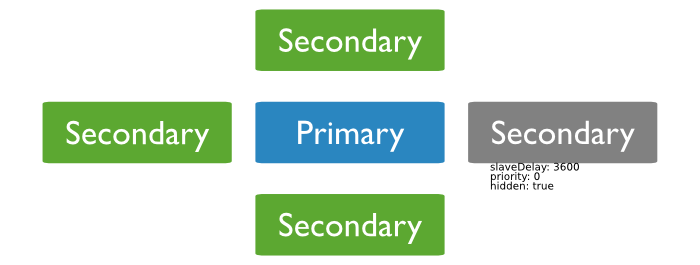
Priority 0 ⇒ Hidden members ⇒ Delayed
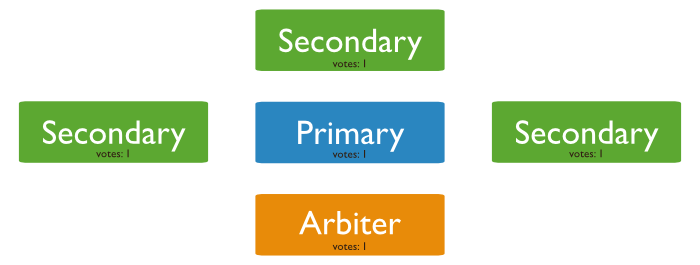
Arbiters (usually at most one) : break ties
Primary acceptes all writes + reads + records them in oplog
Secondary replicates primary oplogs (also accept reads)
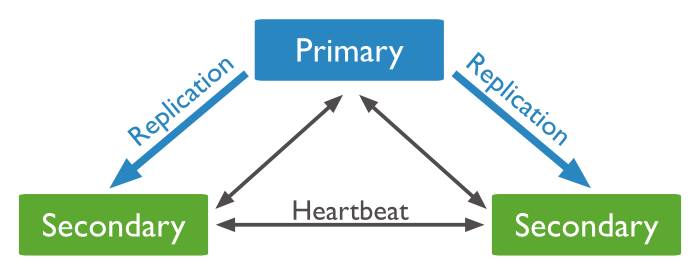
asynchronous oplog replication
heartbeat for monitoring status
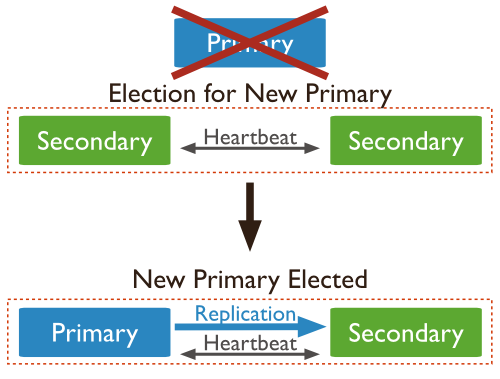
member’s priority
latest optime in the oplog
uptime
break the tie rules
cannot become primary
cannot trigger elections
can vote in elections
copy of data + accepts reads
reflect an delayed state of the set
must be priority 0 ⇒ prevent them to become primary
should be hidden ⇒ prevent application to query stale data
a replica cannot become primary with only 1 vote
majority with even numbers of members ?
use Arbitrers to break ties
does not hold data
cannot became a primary
No primary ⇒ writes no longer possible, reads still accepted
Fault tolerance : number of members that can become unavailable and still be able to elect a primary
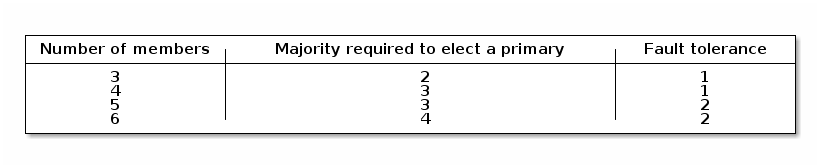
https://docs.mongodb.org/manual/core/replica-set-architectures/a rollback reverts write operations on a former primary when the member rejoins its replica set after a failover
the primary accepted a write that was not sucessfuly replicated to secondaries !
Cause of the problem ?
default write semantics { w:1 } ⇒ the primary acknowledge the write after the local write (local Journal!)
manually apply/discard rollbacks ( rollback/ folder)
avoid rollbacks use { w:majority }
READ UNCOMMITED SEMANTICS
! Regardless of write concern, other clients can see the result of the write operations before the write operation is acknowledged to the issuing client.
! Clients can read data which may be subsequently rolled back.
MongoDB write path
Replication principles
Replica set Read and Write Semantics
Write concerns
Read concerns
Read preferences
Sharding
Replica&sharding practice
parameters to move the CAP cursor
write concern
is the guarantee an application requires from MongoDB to consider a write operation successful
read concern
specify the desired consistency for read operations
read preference
applications specify read preference to control how drivers direct read operations to members of the replica set
w:1 (default)
the primary acknowledge the write after the local write
w:N
ack the write after the ack of N members
w:majority
ack the write after the ack of the majority of the members
wtimeout (optional)
prevents write operations from blocking indefinitely if the write concern is unachievable
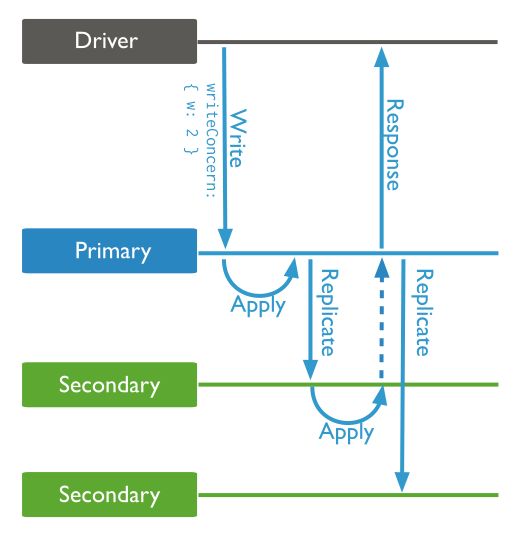
at the query level
db.products.insert(
   { item: "envelopes", qty : 100, type: "Clasp" },
   { writeConcern: { w: 2, wtimeout: 5000 } }
)
change the default write concern:
cfg = rs.conf()
cfg.settings = {}
cfg.settings.getLastErrorDefaults = { w: "majority", wtimeout: 5000 }
rs.reconfig(cfg)local(default) ⇒ returns the instance’s(P/S) most recent data
no guarantee that the data has been written to a majority of the replica set
may be rolled back).
majority ⇒ the most recent data acknowledged by a majority of members in RS
linearizable ⇒ successful writes issued with a write concern of "majority" and acknowledged prior to the start of the read operation
db.restaurants.find( { _id: 5 } ).readConcern("linearizable").maxTimeMS(10000)primary (default): read from the current replica set primary.
primaryPreferred: read from primary (or secondary iff no primary)
secondary: read from secondary members
secondaryPreferred: read from secondary(or primary iff no secondary)
nearest ⇒ least network latency
async replication ⇒ stale data !
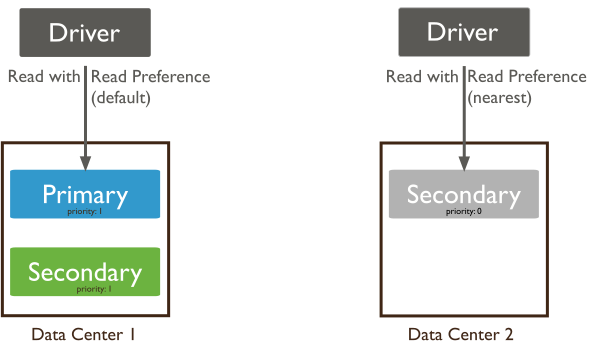
db.emails.find().readPref("secondary")
db.collection.find().readPref('nearest', [ { 'dc': 'east' } ])Maximize Consistency ⇒ primary read preference
Maximize Availability ⇒ primaryPreferred read preference
Minimize Latency ⇒ nearest read preference
MongoDB write path
Replication principles
Replica set Read and Write Semantics
Sharding
Replication and sharding practice
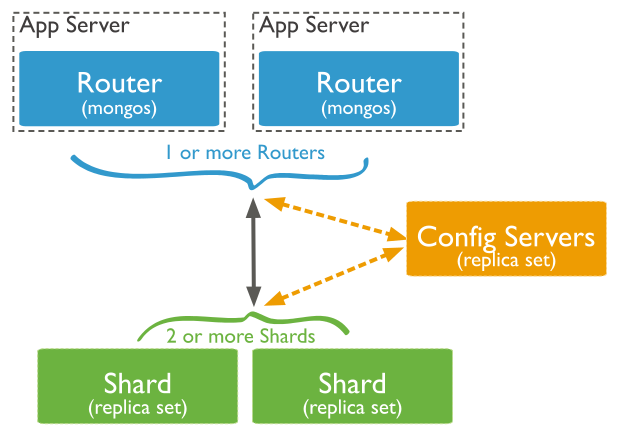
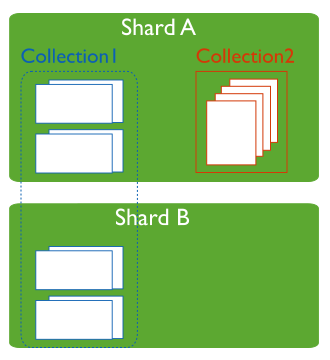
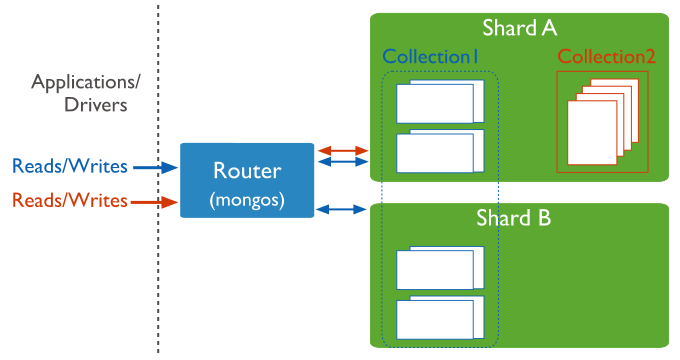
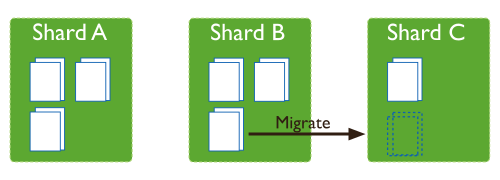
default chunk size 64MB (configurable)
small chunks ⇒ even distribution but frequent migrations (network/mongos overhead)
large chunks_ lead ⇒ fewer migrations, potentially uneven distribution of data (preffered)
Chunk size
⇒ maximum collection size when sharding an existing collection
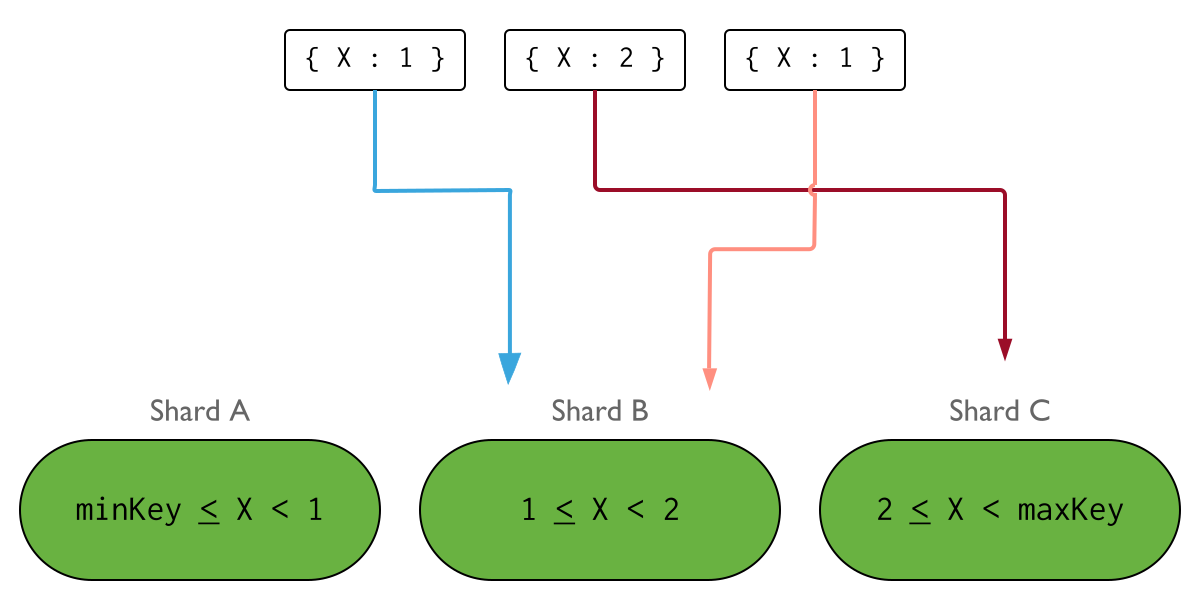
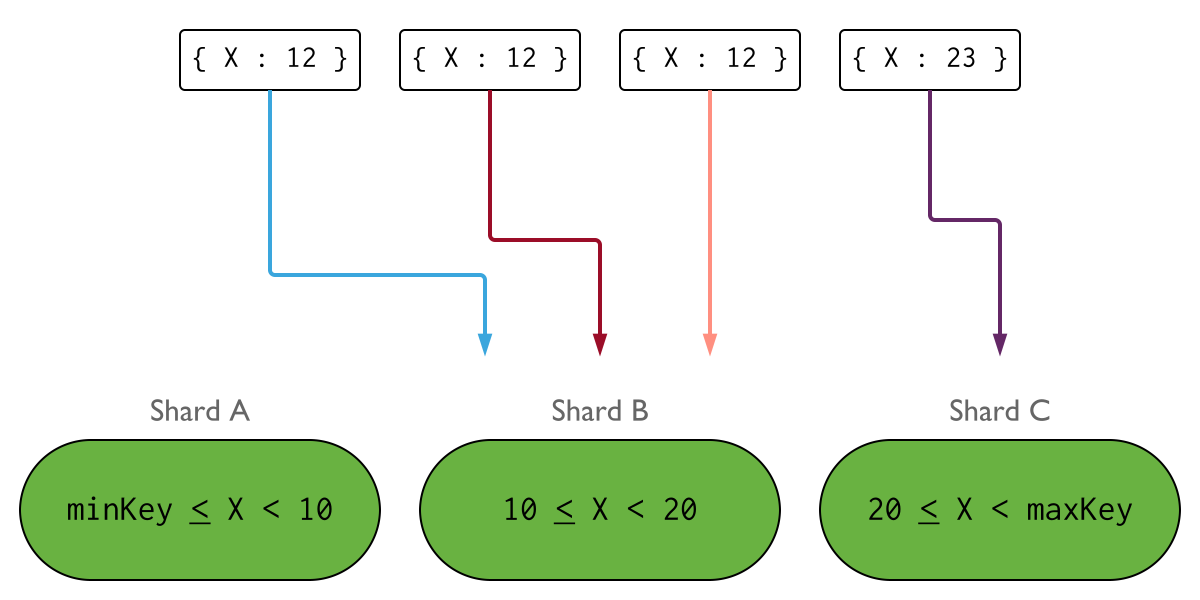
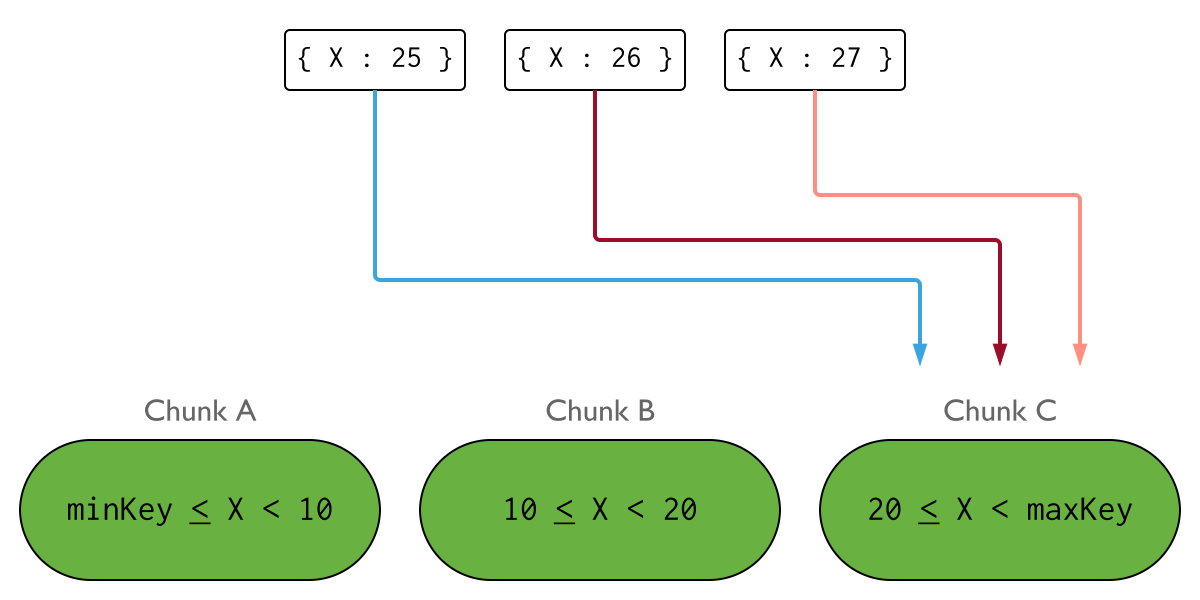
base on the domain of the shard key
documents with shard key values close to one another are likely to be co-located on the same shard
optimize range based queries
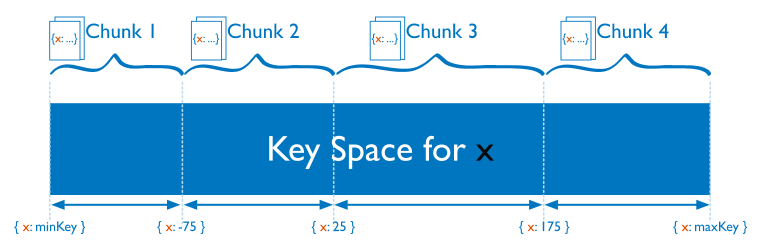
mongos> db.temperature.createIndex( { creation_date : 1 } ); //create index
mongos> sh.enableSharding( "test" ); //enable sharding for database
mongos> sh.shardCollection("test.temperature",{"creation_date":1}); //shard collectiondocuments distributed according to an MD5 hash of the shard key value
guarantees a uniform distribution of writes across shards
but is less optimal for range-based queries
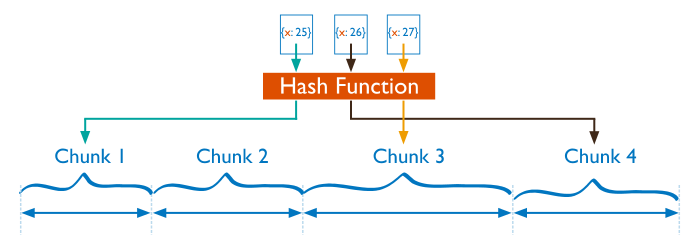
mongos> db.emails.createIndex({sender:"hashed"}); //create hash-index
mongos> sh.enableSharding( "test" ); //enable sharding for database
mongos> sh.shardCollection("test.emails",{sender:"hashed"}); //shard collection
mongos> sh.shardCollection("test.big_collection",{"number":1});
mongos> db.big_collection.getShardDistribution();

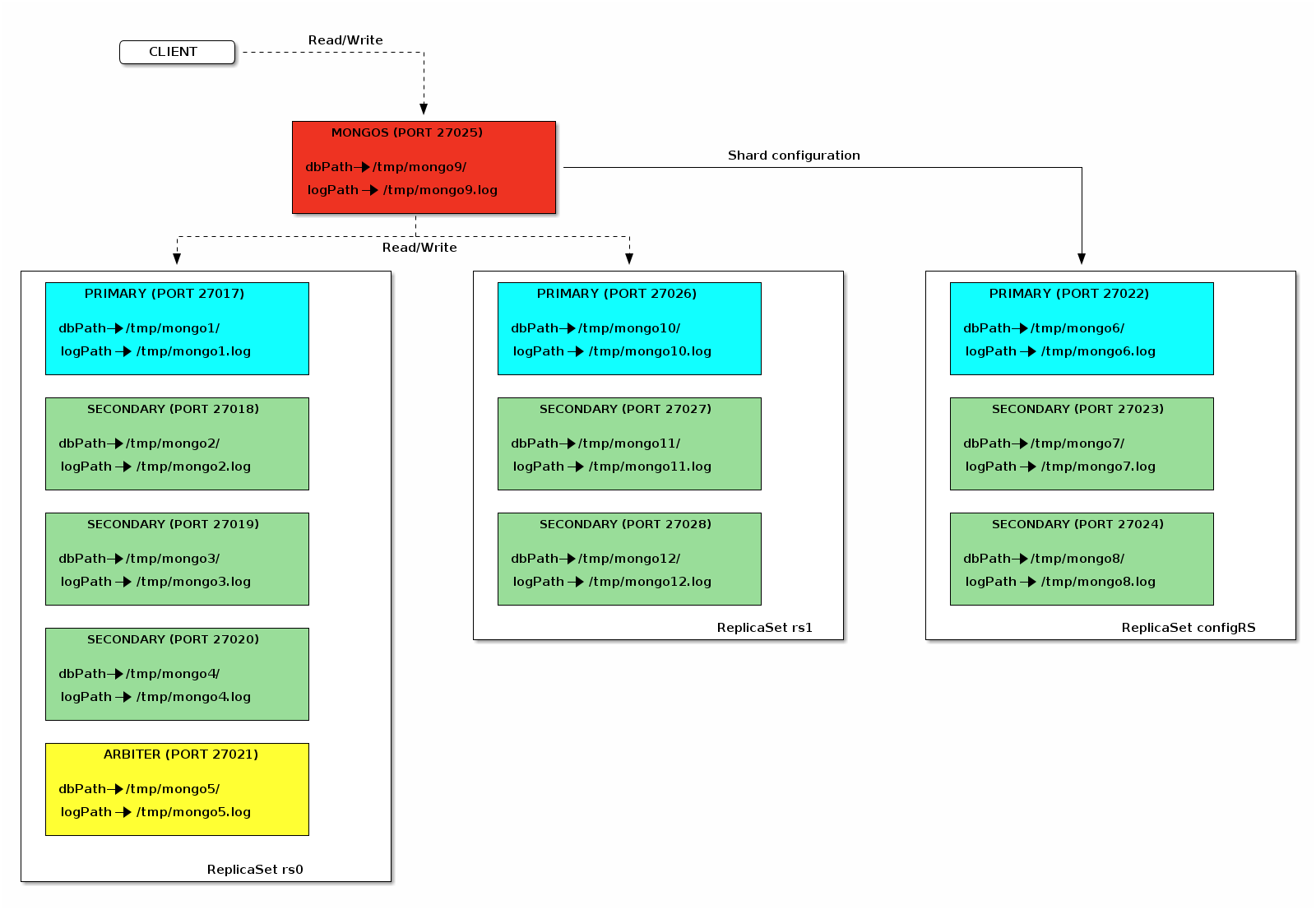
Shard rs0 at rs0/localhost:27017,localhost:27018,localhost:27019,localhost:27020
 data : 122.41MiB docs : 1812256 chunks : 5
 estimated data per chunk : 24.48MiB
 estimated docs per chunk : 362451

Shard rs1 at rs1/localhost:27026,localhost:27027,localhost:27028
 data : 32.36MiB docs : 479181 chunks : 2
 estimated data per chunk : 16.18MiB
 estimated docs per chunk : 239590

Totals
 data : 154.78MiB docs : 2291437 chunks : 7
 Shard rs0 contains 79.08% data, 79.08% docs in cluster, avg obj size on shard : 70B
 Shard rs1 contains 20.91% data, 20.91% docs in cluster, avg obj size on shard : 70B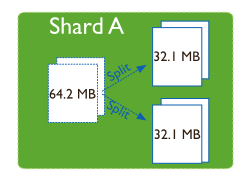
MongoDB write path
Replication principles
Replica set Read and Write Semantics
Sharding
Replication and sharding practice
Read the documentation for the systems you depend on thoroughly–then verify their claims for yourself. You may discover surprising results!